

Import Project Table
Description
Section titled “Description”Copies data from a table in a different project into the current project. The inverse of Export Project Table — pulls rather than pushes.
Useful when a consolidation project sources from many operational projects, or when reference data is centralized in one project and read by others. The source project must grant this project a Read data share.
Data Sharing Management
Section titled “Data Sharing Management”
Before you can import a table from another project, that project has to let this one read it. Open the source project’s Home tab, and under Data Sharing Management click New Data Share, select this project, tick Read under Allowed Operations, and click Add Data Share. See Sharing Data Between Projects.
The step runs as this project’s own identity, so a run works through the share whoever starts it.
Import External Project Table
Section titled “Import External Project Table”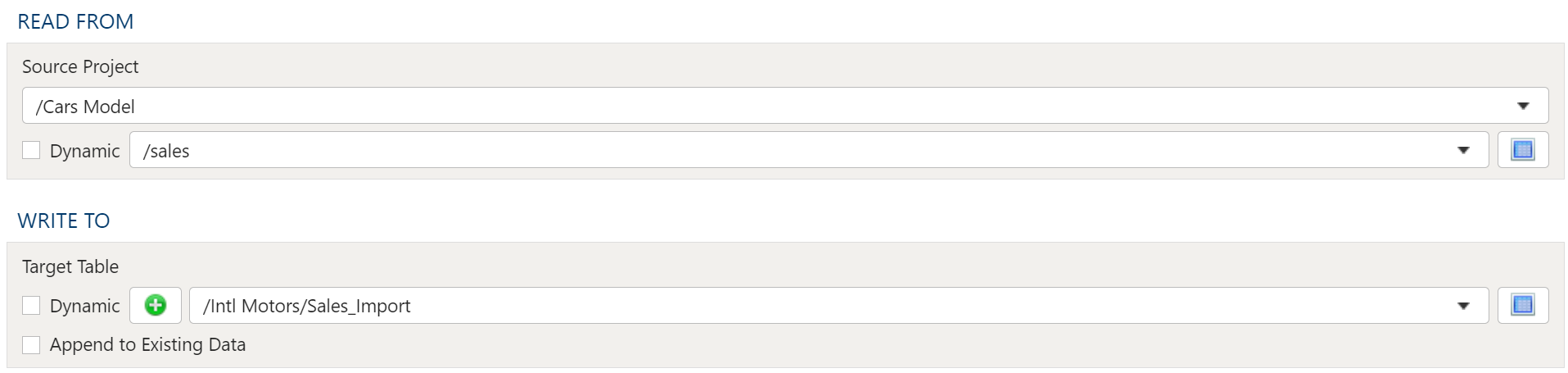
Read From
Section titled “Read From”Select the Source Project and Source Table from the drop downs.
Write To
Section titled “Write To”Target Table
The target selection for imports is limited to tables only since views do not contain underlying data.
Dynamic Option
The Dynamic option allows specification of a table using text, including variables. This is useful when employing variable driven workflows where table and view references are relative to the variables specified.
An example that uses the current_month variable to dynamically point to target table:
legal_entity/inputs/{current_month}/ledger_valuesStatic Option
When a specific table is desired as the target for the import, leave the Dynamic box unchecked and select the target Table.
If the target Table does not exist, select the Create new table button to create the table in the desired location.
Table Explorer is always avaible with any table selection. Click on the Table Explorer button to the right of the table selection and a Table Explorer window will open.