

AI and LLM Architecture
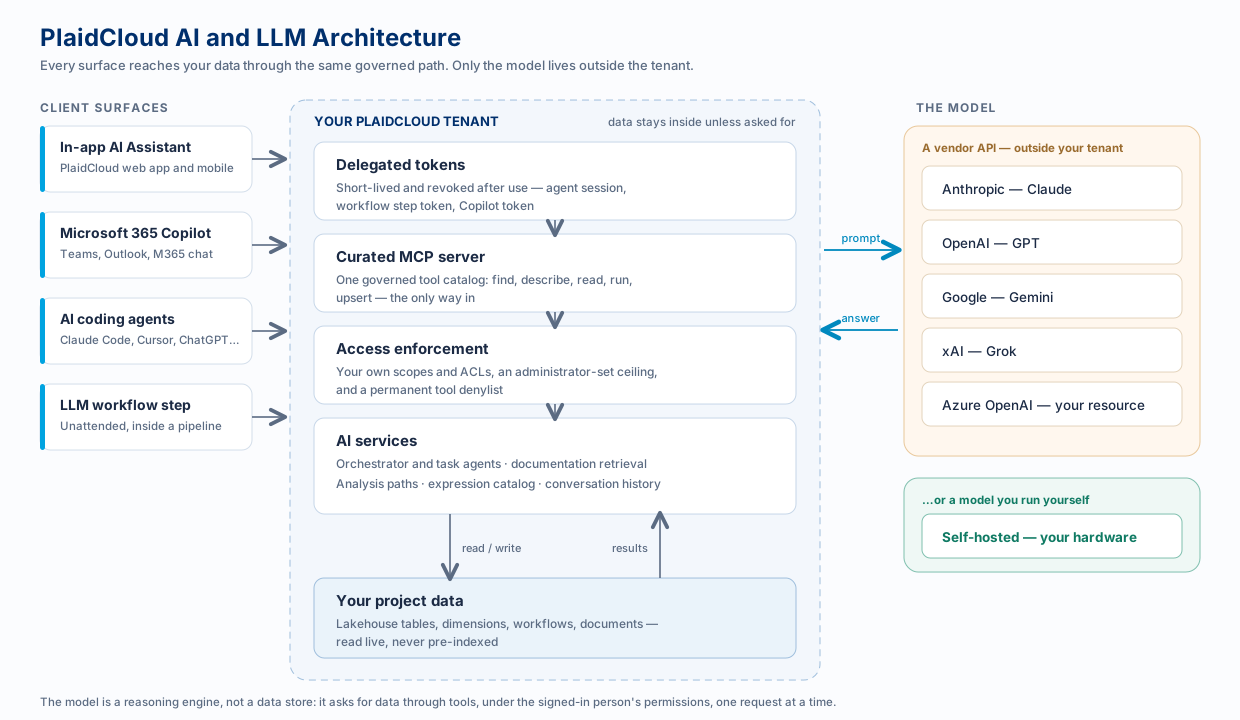
PlaidCloud does not have one AI feature. It has four ways to reach a model — the assistant inside the product, Microsoft 365 Copilot, external coding agents, and an LLM step inside a workflow — and all four run over the same governed path. The model itself is swappable: Claude, GPT, Gemini, Grok, an Azure OpenAI resource in your own subscription, or a model you host yourself.
This section explains that architecture: what runs where, what crosses the boundary, and why.
The Four Surfaces
Section titled “The Four Surfaces”| Surface | Who uses it | How the model reaches data | Where to start |
|---|---|---|---|
| In-app AI Assistant | Anyone working in PlaidCloud | PlaidCloud’s own agents call internal tools on your behalf | Weave AI Chat |
| Microsoft 365 Copilot | Whole teams, in Teams and Outlook | A published agent signs the person in, then calls the MCP server | Microsoft 365 Copilot |
| AI coding agents | Analysts and developers | Their client connects directly to the MCP server over OAuth | Getting started |
| LLM workflow step | Unattended pipelines | On Anthropic, a token scoped to just the objects you bind; on other providers, no data access at all — see the step’s rules | LLM Step |
They differ in who is driving and where the conversation happens. They do not differ in what the model is allowed to touch.
One Governed Path
Section titled “One Governed Path”Whichever surface a question arrives on, the same five things are true.
-
The model runs as a person, not as the platform. Every request carries a short-lived, revoked-when-finished credential that stands in for the signed-in user. There is no shared service account with elevated rights behind the AI.
-
Tools are the only way in. The model cannot query your lakehouse directly. It calls a curated catalog of tools — find, describe, read, run, upsert — and every call is checked independently.
-
Your own permissions still bound it. An AI request can never see or change something you could not see or change yourself. The AI layer narrows access; it never widens it.
-
An administrator sets the ceiling, and it starts closed. An LLM connection’s Agent Access begins at read-only. Microsoft 365 Copilot begins at nothing at all: until an administrator assigns someone an access level, a signed-in person gets no data. These are two separate mechanisms, but raising either only ever caps what the AI may attempt — it never widens what you could already reach yourself.
-
Some things are permanently off-limits. Credential and connection settings, identity and group management, access-control changes, publishing, and deployable code are never callable by an AI credential — no matter what an administrator has granted, on any provider. Those stay human-only.
The Life of a Question
Section titled “The Life of a Question”Take “Why did allocated IT cost for Atlanta go up last quarter?”, asked from any surface:
-
A credential is minted for the asking person, scoped and short-lived.
-
Tools are put in front of the model — narrowed to what the question plausibly needs on the surfaces that do the narrowing, discovered from the catalog on the ones that don’t.
-
The prompt goes to the model — the question, any standing rules, and the tool descriptions. No data yet.
-
The model asks for data through tool calls: resolve the analysis path, read the schema, run the allocation trace, read the driver rows. Each call is permission-checked on arrival.
-
The model answers from what came back, cites the documentation page if it consulted one, and carries a confidence signal and caveats.
-
The credential is revoked. A captured token cannot be replayed after the request ends.
The important detail is step 4: the model does not have your data. It asks for slices of it, and each ask is adjudicated.
Read Next
Section titled “Read Next”Related
Section titled “Related”- Answers You Can Trust — how answers are graded and caveated
- Analysis Paths — friendly names for the tables your team asks about
- Platform Architecture — where AI sits in the wider platform