

Weave Activity History — Every Change Weave Made and Who Approved It
Description
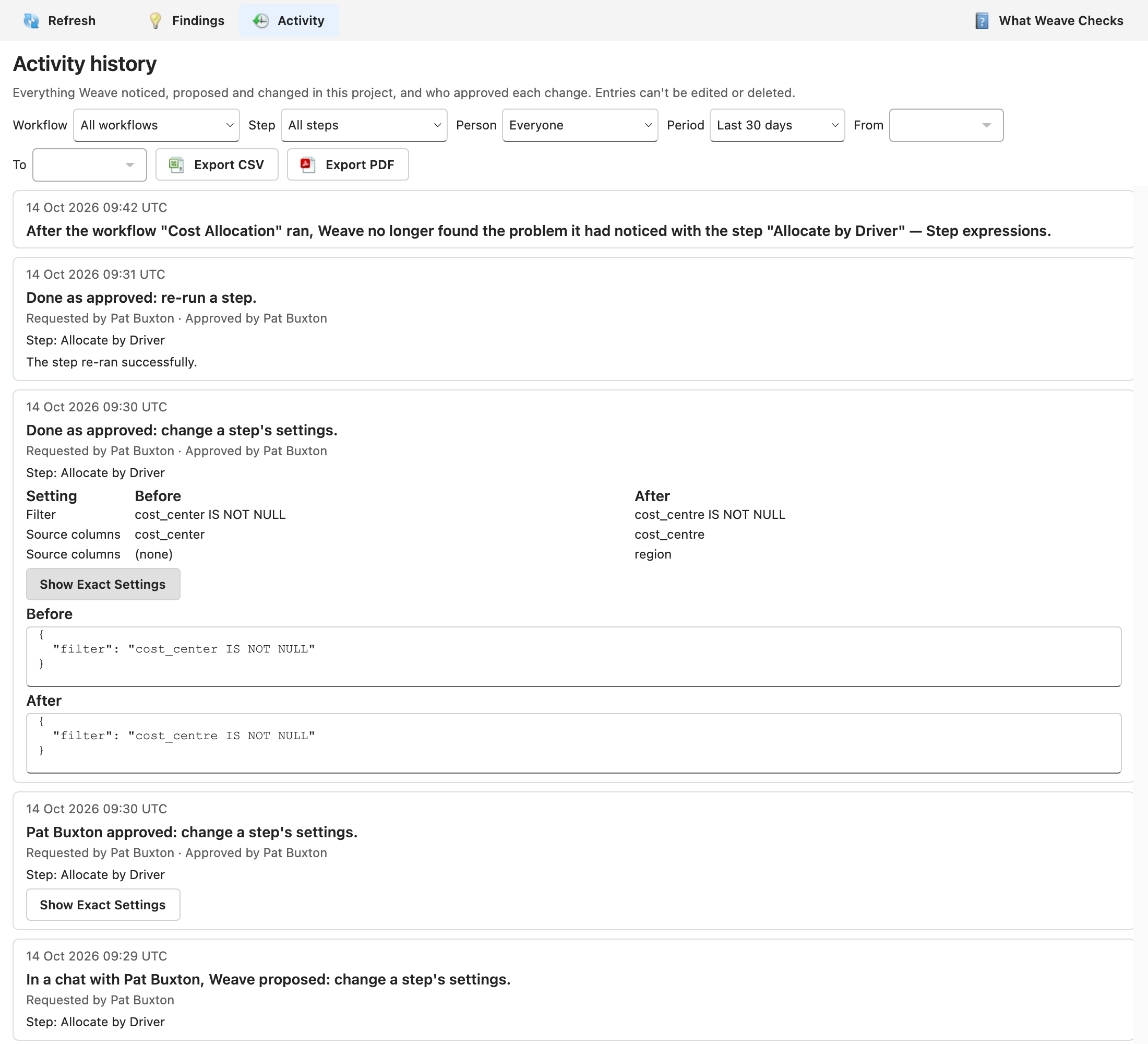
Section titled “Description”Every project keeps a history of what Weave did in it: the problems it noticed and later stopped finding, the changes it proposed in the AI assistant, who approved or rejected each one, exactly what each approved change replaced and wrote, and how it ended. Changes to a table’s freshness threshold are kept there too, and so are the owners people choose for Weave’s findings, their comments on them, and the findings marked as expected.
The history is meant to be handed to an auditor. Entries can’t be edited or deleted by anyone, a tamper check shows whether the history has been altered, and any period can be exported as CSV or PDF.
Open the Activity History
Section titled “Open the Activity History”- Open the project, select the Weave tab, and select Findings in it.
- Click Activity on the toolbar. The Findings button beside it brings back Weave’s findings.
The history lists the newest entries first, 50 at a time, starting with the last 30 days. Click Show Earlier Activity at the end of the list for the next 50. Refresh on the toolbar reads the history again.
Activity appears for anyone whose role can read the project’s steps, workflows and tables. Opening the Weave tab on a workflow’s findings, or switching to another project, returns the tab to Findings.
What It Records
Section titled “What It Records”| What happened | How the entry reads |
|---|---|
| Weave proposed a change in a chat with the AI assistant | In a chat with Nadia Brennan, Weave proposed: change a step’s settings. |
| Someone approved it | Nadia Brennan approved: change a step’s settings. |
| Someone rejected it | Nadia Brennan rejected: change a step’s settings. |
| The approved change was made | Done as approved: change a step’s settings. |
| The approved change didn’t complete | Not completed: change a step’s settings. followed by the reason |
| A step was re-run after a fix | Done as approved: re-run a step. followed by how the run ended, such as The step re-ran successfully. |
| Someone undid a step fix | Nadia Brennan approved: undo Weave’s change to a step’s settings., then Done as approved: undo Weave’s change to a step’s settings. With Undo & Run, the entries end and run the step. |
| Weave noticed a problem after a run | Weave noticed the step “Allocate by Driver”: the expression in its filter has an error: column “cost_center” does not exist. |
| Weave no longer found that problem after a later run | After the workflow “Cost Allocation” ran, Weave no longer found the problem it had noticed with the step “Allocate by Driver” — Step expressions. |
| Someone set, changed or cleared a table’s freshness threshold | Marcus Okafor set Weave to warn if the table “Cost Drivers” isn’t written for more than 26 hours. Before, it was 24 hours. |
| Someone created a table with a freshness threshold | Marcus Okafor created the table “Cost Drivers” with Weave set to warn if it isn’t written for more than 24 hours. |
| Saving a table as a view cleared its threshold | Marcus Okafor saved the table “Cost Drivers” as a view, so Weave no longer warns when it isn’t written for a set time. Before, it was 24 hours. |
| Someone chose a finding’s owner, or handed it back to the owner Weave picks | Marcus Okafor made Nadia Brennan the owner of the finding about the step “GL Actuals Load” — Target rows unlike previous runs. |
| Someone commented on a finding | Nadia Brennan commented on the finding about the step “GL Actuals Load” — Target rows unlike previous runs: “Checking with the GL team.” |
| Someone marked a finding as expected | Nadia Brennan marked as expected the finding about the step “GL Actuals Load” — Target rows unlike previous runs, until the end of 31 Dec 2026: “Month-end load is always heavy” |
| Someone stopped expecting a finding | Nadia Brennan stopped expecting the finding about the step “GL Actuals Load” — Target rows unlike previous runs, so Weave reports it again. |
Every change PlaidCloud’s AI assistant makes after you approve it is recorded, and your approval is recorded before the change is made:
- step fixes, the re-runs that follow them, and undoing a fix;
- new projects, workflows and dimensions;
- import, export and transform steps;
- files loaded into a new table;
- table copies;
- changes to a table’s properties and labels.
A change made in no project, such as creating a project, appears in the new project’s history once it is made.
“No longer found” means what it says. The problem may have been fixed, or the data may have changed so that it no longer shows. Weave doesn’t claim to know which.
Findings Are Recorded When a Run Ends
Section titled “Findings Are Recorded When a Run Ends”Weave checks a workflow and its steps when a run of that workflow ends, as the person the run belongs to, and records each problem it finds that wasn’t already open, and each open problem it no longer finds. A problem stays open in the history until a later check could have found it again and didn’t. When two runs end close together, their checks can be recorded out of order; the next check puts the history right.
Only a check run as one of the project’s Architects closes a problem: a role that is shown less of the project can’t always see what still causes it. A check that couldn’t judge a step, or that doesn’t apply to it, never closes a problem either.
What Each Entry Shows
Section titled “What Each Entry Shows”- When, in UTC. The export gives the same time to the microsecond.
- What happened, in Weave’s words.
- Who — Requested by the person in the chat, Approved by or Rejected by the person who pressed the button, or Changed by the person who set a freshness threshold, chose a finding’s owner, commented on a finding, or marked one as expected or stopped expecting it.
- What it was about — for example Step: Allocate by Driver.
- What changed — each setting under Setting, with its Before and After value. (none) marks a column or record added or removed.
- How it ended — the result of a change, with Part of it may have been done. when a change that didn’t complete may have left something behind, or No result has been recorded for this approval. while a change is still running, or if its result was never recorded.
- Show Exact Settings — the settings themselves, whole. For a step fix that was made, Before and After show each setting it touched. For any other change that was made, After shows what was written. For an approval or a rejection, As proposed shows what was decided on, which wasn’t written unless the change was then made.
Undo a Step Fix
Section titled “Undo a Step Fix”The entry for a step fix Weave kept a copy for shows Undo, to anyone whose role can change steps, until the fix has been undone. It opens the same window as Undo in the chat; see Undo a Fix. Whether the fix can still be undone is checked when you click it: the window says why not when the step has changed since or its earlier settings are no longer kept.
Once the undo has answered, the history is read again, and the undo appears at the top as a change of its own. A fix that has been undone no longer shows Undo.
Filter the History
Section titled “Filter the History”Above the list:
- Workflow — entries about one workflow and its steps.
- Step — entries about one step. With a workflow chosen, only its steps are offered.
- Person — entries a person requested, approved, rejected, changed or commented on.
- Period — Last 7 days, Last 30 days, Last 90 days or Custom. With Custom, choose the first and last day in From and To. Until both are chosen, the list stays on the period it was showing.
Days are whole days in UTC, and the To day is included. Every filter reads the history again from PlaidCloud, which also brings the Workflow, Step and Person lists up to date without changing what you chose. An export lists exactly what is on screen.
Export the History as Audit Evidence
Section titled “Export the History as Audit Evidence”Click Export CSV or Export PDF. The file holds the entries the current
filters show, for the chosen period, as you see them on screen. It is named for
the period, such as weave-activity-20261001-20261014.csv.
The file opens with:
- who exported which period and when — for example Weave activity for the project “Finance Close FY26”, 01 Oct 2026 to 14 Oct 2026. Exported by Nadia Brennan on 14 Oct 2026 at 15:02 UTC.
- the result of the tamper check (see below);
- This export stops at 10,000 entries. Choose a shorter period to export the rest. when the period holds more than 10,000 entries;
- the row-level security note, when it applies to you (see Who Sees What).
The CSV has one row per entry, with the columns Entry, Time (UTC), What happened, Requested by, Approved or rejected by, Changed by, Details, Changes, Result, Exact before, Exact after and As proposed. It is UTF-8 and opens directly in Excel; a value that a spreadsheet would run as a formula is written as text. The PDF lists each entry in full, however long.
Entries Can’t Be Edited or Deleted
Section titled “Entries Can’t Be Edited or Deleted”No screen, API or person in PlaidCloud can edit or delete an entry: the database refuses to change or remove one, and entries never expire.
Each entry is also linked to the one before it by a chain of hashes, so an entry changed or removed outside PlaidCloud breaks the chain from that point on. Every export checks the whole chain and says what it found:
- Tamper check passed: all 1,204 entries in this project’s history match the chain of hashes that links each to the one before it. This check can’t detect entries removed from the end.
- Tamper check failed: entry 312 doesn’t match the chain of hashes, so this history has been altered from that entry on. Contact PlaidCloud support.
Because entries are kept for good, PlaidCloud leaves secrets out of them wherever
it can recognize one: a setting with a name like Password, Token or
API key, a password in a connection URL, and a password quoted in an error
message are all recorded as [redacted].
When an Approval Can’t Be Recorded
Section titled “When an Approval Can’t Be Recorded”Weave records your approval before it makes the change, and makes no change it can’t record. If the history can’t be written, approving the card shows Weave couldn’t record this approval, so it made no change. Try again later, and tell your administrator if it keeps happening. Nothing has been saved, and the card stays open so you can approve it again.
Everything else — a proposal, a rejection, how a change ended, a finding, a freshness threshold — is recorded after it happens. If the history can’t be written at that moment, the event goes unrecorded rather than being held up.
Who Sees What
Section titled “Who Sees What”- Anyone who can open the project, and whose role can read its steps, workflows and tables, can read its history.
- An entry about something your role can’t open — a step, workflow, table or dimension hidden from your role, or one that has since been deleted — still shows that something happened, when, and who did it. It names no step, workflow, table or setting and shows no values, and says This involves something you can’t open, or that no longer exists. PlaidCloud checks steps, workflows, tables and dimensions against your role, so an entry naming anything else, such as a connection, is shown this way to everyone but Architects. A filter on a step or workflow you can’t open finds nothing. Architects can open everything in their project, so they see every entry in full.
- A finding in full is for Architects. An Architect sees Weave’s sentence as it was written. Anyone else sees the step or workflow and the kind of problem — for example Weave noticed a problem with the step “Load Sales” — Empty values unlike previous runs, in the column “region”. — since the full sentence can name things only the person whose run it was could see.
- Owners, comments and what is expected. An entry about a finding’s owner, a comment, or a finding marked as expected names the finding as anyone else sees it, not Weave’s full sentence. Someone who can’t open what the finding is about sees only who changed its owner, commented or changed what Weave expects, and when.
- Row-level security. If row-level security limits which rows you can read in the project, the history leaves out what Weave noticed from the size and contents of tables, along with the owners, comments and expected marks on those findings, and says so above the list.
- Visibility settings. Whether a step or table is visible to Managers or Explorers is shown only to Architects, as on the step’s own form.
What the History Doesn’t Record
Section titled “What the History Doesn’t Record”- Changes you make yourself, other than a table’s freshness threshold and a finding’s owner and comments. The history is about what Weave did.
- Changes made by an AI assistant connected over MCP, such as Claude or Microsoft 365 Copilot. Those act with your own permissions rather than through Weave’s approval. A freshness threshold set that way is still recorded, as it is however it is set.
- ERP postings. These are recorded and governed in the Posting Register.
- Some findings. Weave records findings only from the check it runs at the end of a workflow’s run, which judges that workflow and its steps. A table that isn’t written on schedule, or a table read after another workflow wrote it, is shown in the Weave tab but not in the history. Nothing is recorded from a run that no one started and no schedule owns, a run that was stopped, a macro’s run inside the workflow that runs it, or a run whose step results never finish being written.
- A deleted or moved step’s findings. A problem about a step that is later deleted, or moved out of every workflow, stays open in the history, as no later run checks it.
When the History Is Unavailable
Section titled “When the History Is Unavailable”If the history can’t be read, the view says Weave’s activity history is unavailable instead of showing an empty list, because an empty list would look like Weave had done nothing. Click Try Again, or Refresh on the toolbar.